Monday, March 31, 2014

TYPO3 - Extension tv2fluidge now with support for multilingual websites

For some month ago I published an article about the first version of my extension tv2fluidge, which helps migrating content of a TYPO3 website made with TemplaVoila to Fluidtemplate and GridElements. The first version of tv2fluidge still had some open issues, which I resolved in the meantime.

First of all, I raised the version compatibility level to TYPO3 6.1, since I used the extension to successfully migrated a TYPO3 6.1 website made with TemplaVoila. Also I found some small bugs, which also have been fixed. The last big task was the migration of a multilingual website made with TemplaVoila.

So I started to migrate  a multilingual TYPO3 4.7 website made with TemplaVoila to Fluidtemplate and Grid Elements. After I had processed all 3 migration steps with the webiste, I was a little bit disappointed. The FCE and content migration for the default language worked as expected, but translated content element were not in the right order and the migrated GridElements were messed up when it comes to translated content in Grid Elements columns. Also I had some trouble with Grid Elements, where the original TemplaVoila FCE had the language set to "all languages", because the Grid Element columns in the TYPO3 backend showed all content elements for all languages mulitple times. After some research, I found out that those problems seem to be fixed in later versions of Grid Elements, but not in the version available for TYPO3 4.5 and 4.7.

Below is a screenshot of a TemplaVoila page with a Flexible content element and translated page content.

Original page and Flexible Content Element
Atfer the migration, the resulting page and grid element looked like shown on the next screenshot.

Page and Grid Element after migration
As you can see, the Grid Element with the language set to "all languages" shows content for all languages. Also the sorting of the translated content elements is'nt correct when you compare it with the original conent elements for the default language.

So in order to migrate my multilingual TYPO3 websites made with TYPO3 4.7 I had to find a solution how to automatically migrate and reassign child content elements for Grid Elements with has "all languages" configured. Also I had to find a way how to fix the sorting of translated content elements.

Handling Grid Elements with language set to "all languages"

I came to the decission, that it would be best to have an individual translated Grid Element for each page language. Having this, I could reassign all translated child content elements to the individual translated Grid Elements.

The updated version of tv2fluidge contains a conversion utility to handle exactly this situation. It searches all Grid Elements, where the language ist set to "all languages" and then clones those Grid Elements to the amount of translations for each individual page. Then it reassigns all child content elements to the desired columns of the translated Grid Elements so you end up with a clean translated content structure in the TYPO3 page module.

Page view, where the Grid Element has been cloned to each individual language
and translated content elements reassigned
The list module for this page shows how the Grid Element and the content elements are associated.

Listview for the page with the Grid Element


After conversion, there is ony one thing you have to do manually. If the original Flexible Content Element had FlexForm settings (e.g. input-fields or images), you must manually migrate the content and reconfigure the Grid Element as described in the extension manual.

Fix the sorting of translated content elements

In order to get the correct sorting of translated content elements I have created a module for tv2fluidge, which fixes the sorting for all translated content elements by setting the database field "sorting" to the sorting of the original content element multiplied with the uid of the language of the translated content element.

After processing all pages with the new "Fix sorting" module in tv2fluidge the sorting of the translated content elements finally looked good.

Page view with fixed sorting

The new version of tv2fluidge is available on TER and GitHub and I already used it to migrate Websites made with TYPO3 4.5 LTS, TYPO3 4.7 and TYPO3 6.1. As the long awaited TYPO3 6.2 LTS has been released last week, I can start planning the first migration projects (TYPO3 4.5 with TemplaVoila-> migrate to FluidTemplate and Grid Elements -> migrate to TYPO3 6.2 LTS). Now I just have to wait until the major extensions have raised compatibility to TYPO3 6.2 LTS.

Monday, March 17, 2014

TYPO3 - suddenly unable to login to backend

Last week I had a really strange problem with one of my TYPO3 websites. A colleague came to me and said he was unable to login to the TYPO3 backend. I tried to login with my own TYPO3 backend account and experienced the same problem.

First I thought the TYPO3 site could have been hacked, so I took a look into the be_users and sys_log tables of the TYPO3 installation but could not see anything suspicious. Also the webservers logfiles did'nt show any errors. I then logged into the TYPO3 install tool and created a new admin backend user for the TYPO3 site. With this user, I should be able to login to the TYPO3 backend... well, at least I thought so. But also with the new admin account I was'nt able to login, so something was really wrong with the TYPO3 website.

Again I looked into the be_users table and saw, that the newly admin account had a normal MD5 hash in the password field. The site used rsaauth and saltedpassword and normally both extensions should be able to distinguish between passwords with MD5 hashes and password with salted hashes, but obviously not on this TYPO3 website. I therefore removed both rsaauth and saltedpasswords, resetted the loginSecurityLevel to "normal" mode in the TYPO3 install tool and was finally able to login to the TYPO3 backend with my new admin user.

So the login problems must have something to do with saltedpasswords and rsaauth. First I checked the path, where rsaauth writes its temporary data, but could not see anything special there. Next I wanted to check the database table, where rsaauth stores the private keys and finally came to the solution of this problem.

The database table tx_rsaauth_keys was marked as crashed and could not be repaired automatically. So the rsaauth extension was unable to write its private keys to the database and therefore the rsaauth login never succeeded. After I reparied the crashed table manually and reenabled rssauth and saltedpasswords, everything worked fine again.

Friday, February 21, 2014

TYPO3 - Conditionally add an additional wrap to RTE links using Typoscript

In a project I needed to enable the editor to create links in RTE, that automatically should get a wrap based on the class the link has.

Assume the editor creates a link in RTE and selects the link class "myClass". The resulting HTML output is:

<a href="target-page-id" class="myClass" title="sometitle">My Link</a>

My CSS styling now required, that the a-tag must be surrounded with a div-tag that has a special class. My final output should look like this:

<div class="anotherClass">
  <a href="target-page-id" class="myClass" title="sometitle">My Link</a>
</div>

As I did'nt want to bother the editor with special frames and layouts for the RTE text, the additional class should be added automatically as soon as the link has the special class name.

Well, what sounds simple, can be hard to process...

I asked on stackoverflow but did'nt get an answer. After some research, I found this article on TYPO3 wiki, which pointed me to the right direction. I did some hours of Typoscript debugging and finally managed to get a working solution.

lib.parseFunc.tags.link {
  typolink.parameter.append = LOAD_REGISTER
  typolink.parameter.append {
    linkClass {
      cObject = TEXT
      cObject {
        stdWrap.data = parameters:allParams
      }
      # Split link params by space-char. 3rd value is the link class name
      split {
        token.char = 32
        # Option for TYPO3 7.6+ below
        cObjNum = 1||2||3||*
        # Option for TYPO3 6.2 LTS
        #cObjNum = 1||2||3
        3 = TEXT
        3.current = 1        
      }
    }
  }
  newWrap.cObject = CASE
  newWrap.cObject {
    key.data = register:linkClass
    # Set outer wrap for links depending on class name
    default = TEXT
    default.value = |
    myClass = TEXT
    myClass.value = <div class="anotherClass">|</div>
    internal-link = TEXT
    internal-link.value = <div class="anotherClassForInternalLink">|</div>
  }
}

lib.parseFunc_RTE.tags.link {
  typolink.parameter.append < lib.parseFunc.tags.link.typolink.parameter.append
  wrap < lib.parseFunc.tags.link.newWrap
}

TYPO3 is just so powerfull and extendable that you never finish learning.

Monday, January 6, 2014

TYPO3 - In-Place migration from TemplaVoila to Fluidtemplate and Grid Elements


In the past few years I have made several websites with TYPO3 4.5 LTS and TemplaVoila. The new LTS of TYPO3 is going to be released march 25th, 2014 and there will surely also be a version of TemplaVoila, which is compatible with TYPO3 6.2 LTS, but is TemplaVoila a future-proof solution that will be supported by the community?

When Tolleiv wrote in his blogpost, that TemplaVoila won’t be actively distributed and supported any more by him, I stopped using it for new website projects and switched to Fluidtemplate and Grid Elements which both work great.

I asked myself what to do with the TYPO3 websites I have made with TemplaVoila? Is it maybe possible to migrate a TemplaVoila website to Fluidtemplate and Grid Elements? Or should a website based on TemplaVoila be built up completely new from scatch if you want to switch the template engine?

Starting to test a migration

I started to test a migration from TemplaVoila to Fluidtemplate and Grid Elements on some of my websites. Doing so, I quickly came to a point where I was frustrated and about to drop the migration process, because I had to do a lot of work manually. After I created all Fluidtemplates and Grid Elements, I had to reassign the content elements from TemplaVoila content columns to the backend layout Fluidtemplate content columns, since not all TemplaVoila columns could be automatically migrated to the corresponding content column in the backend layout. Also I had to manually migrate content and FlexForm content for all Grid Elements I created. At this point, I started to create the TYPO3 extension sf_tv2fluidge, which helped me to automate some tasks in the migration process.

Removing unreferenced content elements

The first thing I stumbled across in the migration process were unreferenced content elements. I have seen several websites, were the "Non-used elements" tab in the TemplaVoila page view contained many, many records (sometimes more than 50 elements), because users thought, that those elements have been deleted. Well, actually they are just unlinked and not visible, but still present on the page. So the first thing I had to do during the migration process to Fluidtemplate was to remove all unreferenced elements, because Fluidtemplate does not know anything abount unreferenced content. Since it is not very efficient to remove all unreferenced elements manually, I created an action for sf_tv2fluidge, which recursively for all pages marked all unreferenced elements as deleted.

Migrating TemplaVoila mapped content to Fluidtemplate

I used to create several page templates with different amount of content columns with TemplaVoila. While migrating to Fluidtemplate, I found out, that TemplaVoila mapped content elements could not always just be migrated to the corresponding content column of a Fluidtemplate backend layout. For smaller websites with just one TemplaVoila content column, the migration of all content elements was easy and I did not have to reassign the column position of the content elements, but for more complex templates with multiple content columns the result was mixed up and content did'nt show up in the corresponding content column of the backend layout. Also the sorting of the content elements was not the same as in TemplaVoila.

Content migration from TemplaVoila to backend layouts with Fluidtemplate

I therefore created a content migration helper in sf_tv2fluidge which allows to assign TemplaVoila content columns to backend layout content columns and finally migrate all affected content elements to the target content columns and keep the sorting of the content elements. Also the helper sets the corresponding backend layout for the matching pages.

TemplaVoila references

One nice feature of TemplaVoila is the ability to create references to content elements. Sadly, my newly created content migration helper did not migrate referenced content, so I digged deeper into the functionality of that feature in TemplaVoila.

When TemplaVoila creates a reference to a content object, it just saves the uid of the referenced content element in an XML node. In this XML node, also all other uids from content elements on the corresponding content column are saved. The sorting of records is just as the uids are ordered in the XML node. So the original content element remains on source the page and the reference is just evaluated by TemplaVoila when rendering content in frontend or displaying content elements in the backend page module.

The traditional way of referencing content in TYPO3 is to create a shortcut to an content element by using the "Insert record" content element. This actually creates a new record in the tt_content table which holds the uids to the referenced content objects. Also it contains the column position and the sorting.

So doing the content migration I had to create a new shortcut for each TemplaVoila reference and also respect the sorting of all content elements in the TemplaVoila content column.

Migrating TemplaVoila Flexible Content Elements to Grid Elements

The last big task was releated to TemplaVoila Flexible Content Elements. I normally used Flexible Content Elements when I wanted to enable the site editor to add dynamic content structures to a page. Examples for Flexible Content Elements are elements with muliple columns, sliders or accordions.

As Flexible Content Elements are part of TemplaVoila, they also need to be migrated when you want to use Fluidtemplate as your templateengine. The best approach to do this, is to use Grid Elements, which supports the same XML structure for flexforms as TemplaVoila does. So it should at least be possible to migrate the content from Flexible Content Elements to Grid Elements.

Now you could just copy the flexform structure of a Flexible Content Elements to a new Grid Element and try to get things working, but this approach is really not recommended. Grid Elements integrates directly into the TYPO3 page module and the user can for example use drag and drop with content elements directly on Grid Elements. By just copying the flexform XML structure of your Flexible Content Element to a new Grid Element, you will loose some advantages of Grid Elements. So you have to look at each Flexible Content Element individually and choose the best matching approach (e.g. recreate, migrate flexform or mixed recreation/flexform migration).

When all Grid Elements have been created, content must be migrated. Here I faced a different situation as for normal page content. On one side, a Grid Element can have content columns, where content elements from Flexible Content Elements should be remapped. On the other side, a Grid Element can have a flexform XML structure, which is used to allow the user to input content. And finally, a Grid Element can also be a combination of both content columns and flexform.

Migration from Flexible Content Elements to Grid Elements


I added a Flexible Content Element to Grid Elements migration helper to sf_tv2fluidge, which tries to respect all 3 scenarios described above, keeps care of referenced content, migrates all content and user input made through flexform and finally converts the Flexible Content Element in the tt_content table to a Grid Element.

Screencast of a in-place migration

Well, by now this article was very theoretical and I think it is hard to show a complete site migration by screenshots, so I created a screencast which shows a complete migration process of a demosite, which I created for this article.


Conclusion

As you could see in the screencast, it is possible to migrate an existing TYPO3 website made with TemplaVoila to Fluidtemplate with Grid Elements. You will of course have to do some work by creating Fluidtemplates and Grid Elements, but can benefit from sf_tv2fluidge which helps you to automate several migration steps.

I'm pretty sure, that not all websites can be migrated as smooth as shown in the screencast, since I did not test the migration of a multilingual website and also I did not test Flexible Content Elements with containers for elements.

References

1. Extension on GitHub: https://github.com/derhansen/sf_tv2fluidge
2. Extension on TER: http://typo3.org/extensions/repository/view/sf_tv2fluidge

Monday, December 2, 2013

Selenium tests on a Windows 8.1 machine with Internet Explorer 11

Today I tried to add an Windows 8.1 machine to my Selenium Grid and ran into some strange problems. I installed a new Windows 8.1 (32 bit) machine as a selenium node for my selenium grid. After the installation of Windows 8.1 was completed, I configured all browsers (Internet Explorer, Chrome, Firefox and Opera) and the necessary Webdrivers on the machine. Then I connected the machine to the Selenium grid and started some tests. everything seemed to run fine until I started the tests on Internet Explorer 11.

When running the tests, the browser window opened the requested URL as expected but then nothing more happened. The window did'nt even close after the test, so there must be something wrong. In the Selenium log on the machine I could see, that selenium was unable to find an element, which definitely was present on the website. After some debugging and search in the internet I found out, that Internet Explorer 11 on Windows 8.1 by default has some security settings, which must be disabled in case to run Selenium tests on the machine.

  • Disable the Protection Mode for all zones
  • Disable "Enhanced Protection Mode"

After I disabled both settings (directly in the "Internet Options") the tests were executed as expected.

Also make sure to use 32 bit versions of both the Internet Explorer driver and the operating system. I tried to get things running with the 64 bit version of Windows 8.1, but the test execution on Internet Explorer was extremely slow (it took about 4 seconds to type a character), so I ended up using the 32 bit version of Windows 8.1.

Monday, November 18, 2013

Howto debug a TYPO3 ExtBase extension with PhpStorm and XDebug


In this article I will show you step by step, how simple it is to setup PhpStorm and XDebug to debug a TYPO3 ExtBase extension. Of course you can also debug every other TYPO3 component with this setup.

Setup 

Before you can start with debugging, you need to setup XDebug, a debugging extension for you webbrowser and your PhpStorm project.

XDebug Setup
First you need to install XDebug on you system and add the following lines to your xdebug.ini (on Ubuntu 12.04 the file is located at /etc/php5/conf.d/xdebug.ini) configuration file.

xdebug.max_nesting_level = 500

xdebug.idekey = PHPSTORM
xdebug.remote_host = 127.0.0.1
xdebug.remote_enable = 1
xdebug.remote_port = 9000
xdebug.remote_handler = dbgp
xdebug.remote_mode = req

Make sure you restart your webserver after you have added updated the XDebug configuration file.

Browser Setup
Next you need to install a debug extension for you webbrowser. Since I use Google Chrome, I install the Xdebug helper, which is open source (on GitHub) and available on the Google Chrome Web Store.

PHPStorm Setup
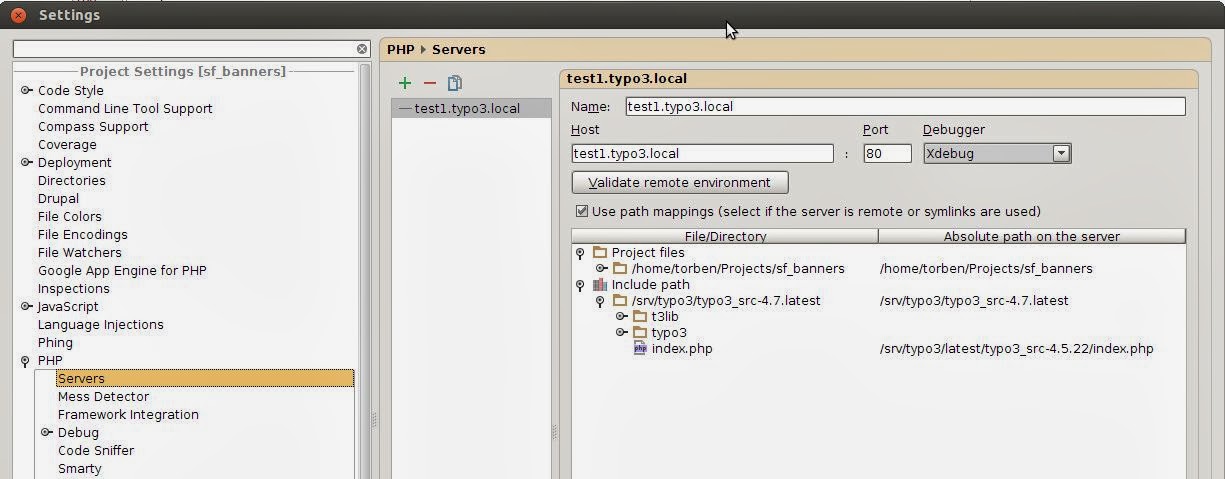
Finally configure the server in you PhpStorm project settings like shown below.

Server Configuration

There are 2 important things to keep in mind.
  1. The host must not contain http:// 
  2. Symlinked files/directories must be mapped manually. On the screenshot above I map the typo3_src folder and the project-folder to to real location on my filesystem.
That's it - now you are ready to debug your TYPO3 ExtBase extension in PhpStorm.


Start debugging
Now it's time to start the debug session.

1. Enable your browser debug extension for the website you want to debug. In Chrome you just click on the debug icon.


2. Enable PhpStorm to listen to debug sessions by clicking on the icon shown below.


3. Set a breakpoint in your controller


4. Open the website on the server. PhpStorm now catches the incoming debug session and stops at the first breakpoint.


As you see on the screenshot above, PhpStorm stops at the breakpoint which has been set in step 3.

Happy debugging!


Troubleshooting

1. PhpStorm claims port 9000 is busy.
I had this error on an Ubuntu 12.04 development machine. Here php-fpm was installed and was listening on port 9000, so it was conflicting with XDebug. to resolve this problem I changed to port for php-fpm to listen to port 9001 instead by editing the configuration file /etc/php5/fpm/pool/www.conf

2. Debugger does'nt stop at breakpoint
When the debugger does'nt stop at the breakpoint, then it could be, that there is something wrong with the path mapping. I resolved this by adding xdebug_break(); to my code which resulted PhpStorm in stopping at the line with xdebug_break() and I could fix the path mappings at this point manually.


Tuesday, November 12, 2013

How to use content element layouts with gridelements

I often use the content element layout field in TYPO3 to add some selective CSS styling to content elements. For example, if the editor inserts a divider content element on a TYPO3 page, she/he can adjust the color of the divider by using the content element layout field like shown below.


I just define the available layouts in the page TS of the root page.

TCEFORM.tt_content.layout {
  addItems.60 = Color: Brown
  addItems.61 = Color: Gray
}

Then I use the following Typoscript to add an extra css class to the divider (e.g. brown and gray).

temp < tt_content.div
tt_content.div = CASE
tt_content.div {
  key.field = layout
  default < temp
  
  60 = COA
  60 < temp
  60.wrap = <div class="divider brown">|</div>

  61 = COA
  61 < temp
  61.wrap = <div class="divider gray">|</div>
}

Normally I globally use the defined content element layouts on other content elements too (e.g. headers), so the editor always uses the same field in TYPO3 to change the colors of content elements. You can also use the shown technique with gridelements, so the user can change the css styling of the gridelement without the need to use a flexform configuration. I just reuse the previously defined content element layout in the Typoscript of my gridelement as shown below by using a CASE on the wrap.

# ID of gridelement 
1 <  lib.gridelements.defaultGridSetup
1 {
  columns {
    # column 1
    0 < .default
    0.wrap = <div class="column1">|</div>

    # column 2
    1 < .default
    1.wrap = <div class="column2">|</div>
  }
  wrap.cObject = CASE
  wrap.cObject {
    key.field = layout
    default = TEXT
    default.value = <div class="mydefaultclass">|</div>

    60 = TEXT
    60.value = <div class="mydefaultclass brown">|</div>

    61 = TEXT
    61.value = <div class="mydefaultclass gray">|</div>
  }
}

Now the gridelement uses the TYPO3 content layout field to add an extra CSS class to its wrap.